Architecture Overview
Circadify platform architecture for contactless vital signs measurement.
Circadify combines local SDK capture with secure cloud processing. The SDK handles camera access and scan preparation on the user's device. Circadify returns vital sign results to your application and does not retain health data by default.
System Architecture
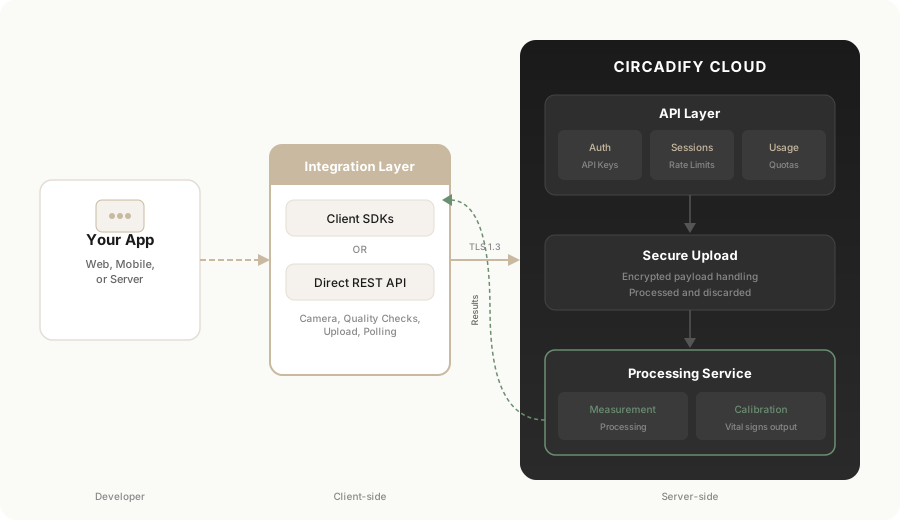
Client Layer
Your app owns the UI, permissions, preview surface, and result handling. The SDK manages capture and measurement preparation.
API Layer
Circadify validates API keys, manages short-lived sessions, enforces usage quotas (and sandbox rate limits), and coordinates secure upload and result delivery.
Processing Layer
Circadify processes the measurement payload and returns vital signs to your application.
Integration Paths
Use the iOS SDK in native Swift apps targeting iOS 17.0+ (Swift 5.10+). Distributed from https://sdk.circadify.com/ios/circadify-ios-sdk.git as a private Swift package (CircadifySDK), resolved over Swift Package Manager.
let sdk = try CircadifySDK(apiKey: "ck_live_your_key_here")

let camera = CircadifyCamera()
try await camera.start()

let result = try await sdk.measureVitals(camera: camera)All four SDKs install from sdk.circadify.com with one Circadify access token. Web, React, iOS, and Android all download from Circadify-hosted infrastructure (https://sdk.circadify.com/npm/, /ios/, and /maven/) using a single Circadify SDK access token — no GitHub account or PAT required. Get the token once from the developer portal (Integrate → SDK Access) and use it for every platform.
Design Principles
- SDK-first integration - Use the platform SDKs for supported capture, upload, and result handling.
- Privacy by design - Raw camera video and raw frames stay on the user's device.
- Short-lived processing - Measurement payloads are processed for the requested scan and discarded after processing.
- No generated results - Current native SDK behavior surfaces processing failures as errors rather than returning placeholder values.
- Secure by default - Requests use TLS and API-key authentication.
Public docs do not contain low-level processing formats or implementation details. Contact Circadify for approved custom integration requirements.
Next Steps
- Data Flow - High-level lifecycle
- Android SDK Installation - Native Kotlin setup
- Python SDK Installation - Webcam, video, frames, or server setup
- Security Overview - Security and privacy model
- REST API Overview - Public endpoint reference