
Client Layer
The @circadify/sdk runs in the browser. It captures video via the camera, detects facial landmarks, extracts regions of interest (ROIs), and encodes them into a structured tensor for upload. No raw video leaves the device.
Circadify is a hybrid client-server platform for contactless vital signs measurement using remote photoplethysmography (rPPG). The client performs real-time face detection and preprocessing, while the backend runs GPU-accelerated inference to extract vital signs from the preprocessed data.
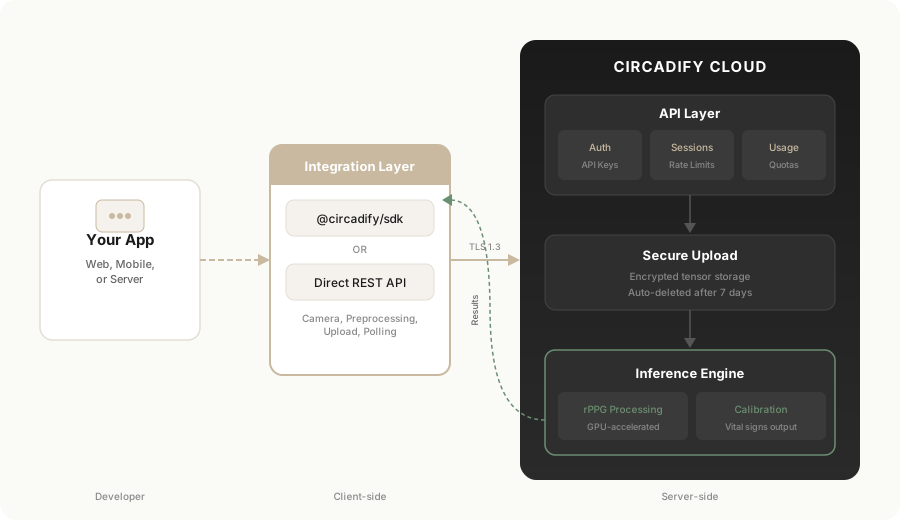
The platform has three primary layers:
Client Layer
The @circadify/sdk runs in the browser. It captures video via the camera, detects facial landmarks, extracts regions of interest (ROIs), and encodes them into a structured tensor for upload. No raw video leaves the device.
API Layer
Serverless API endpoints handle authentication, rate limiting, session management, and secure upload URL generation. Session state is short-lived and encrypted. Developer accounts, API keys, and usage data are stored in a managed database.
Inference Engine
GPU-accelerated compute processes the uploaded tensor through the rPPG signal processing model, extracting physiological signals and returning calibrated vital signs. The inference layer scales on demand.
You can integrate Circadify in two ways: using the SDK (recommended) or calling the REST API directly.
The SDK handles the entire pipeline — camera access, face detection, preprocessing, upload, and result polling — in a single async call:
import { CircadifySDK } from '@circadify/sdk';
const sdk = new CircadifySDK({  apiKey: 'ck_test_your_key_here',  onProgress: (p) => console.log(`${p.phase}: ${p.percent}%`),});
const result = await sdk.measureVitals({  container: document.getElementById('scan-container'),});
console.log('Heart Rate:', result.heartRate, 'BPM');console.log('SpO2:', result.spo2, '%');
The SDK is ~38 KB (ESM). WASM dependencies (~12 MB total) are lazy-loaded and cached by the browser.
If you cannot use the npm package (e.g., native mobile, server-side, or custom preprocessing), you can call the REST API directly. You are responsible for camera access, preprocessing, and upload:
# 1. Start a sessioncurl -X POST https://api.circadify.com/sdk/session/start \  -H "X-API-Key: ck_test_your_key_here" \  -H "Content-Type: application/json"
# Response: { "session_id": "...", "upload_url": "...", "expires_at": ... }
# 2. Upload preprocessed tensor to the secure upload URLcurl -X PUT "$UPLOAD_URL" \  -H "Content-Type: video/webm" \  --data-binary @tensor.bin
# 3. Notify the backend that upload is completecurl -X POST https://api.circadify.com/sdk/session/$SESSION_ID/upload-complete \  -H "X-API-Key: ck_test_your_key_here"
# 4. Poll for resultscurl https://api.circadify.com/sdk/session/$SESSION_ID/result \ -H "X-API-Key: ck_test_your_key_here"confidence: 0.0 so the client always gets a response. Always check the confidence score.All SDK and API requests are authenticated with API keys in the format ck_{environment}_{hex}:
ck_test_*) — For development and testingck_live_*) — For production useKeys are passed via the X-API-Key header. Each request is validated against:
Rate limit headers are returned on every response:
X-RateLimit-Limit: 300X-RateLimit-Remaining: 297X-RateLimit-Reset: 1712000000| Starter | Pro | Enterprise | |
|---|---|---|---|
| Monthly scans | 500 | 5,000 | 50,000 |
| Requests/hour | 300 | 1,000 | 5,000 |
| API keys | 3 | 5 | 10 |
| Vitals | All 6 | All 6 | All 6 |
All plans include heart rate, respiratory rate, HRV, SpO2, systolic BP, and diastolic BP.